
Заголовок раздела
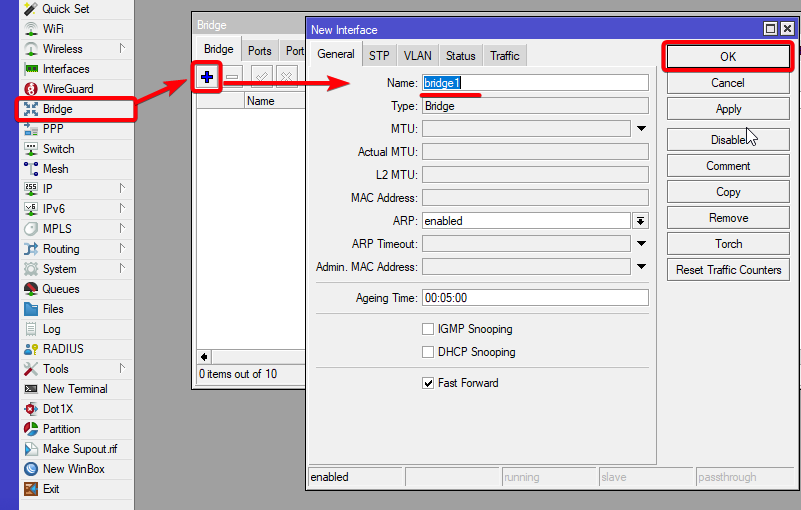

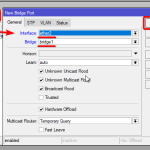
Тут будет ваш контент. Верстайте как угодно: текста, таблицы, код, изображения.
Подраздел
Больше условного контента, параграфы, списки и т.д.
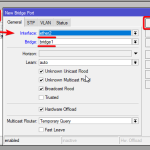
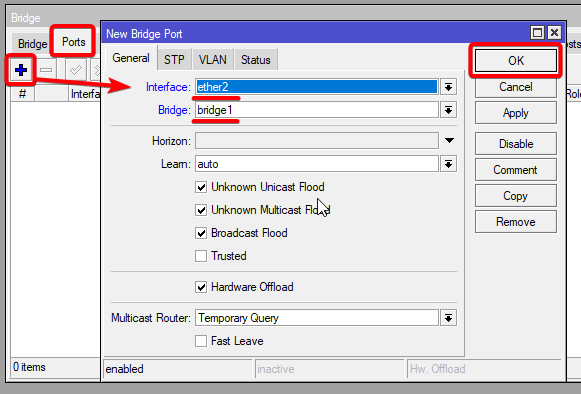
// пример блока кода
function hello(){ console.log('hello'); }
/interface print /interface set ether13 disabled=yes Hardware Support
MikroTik made devices: RouterOS is compatible with MikroTik hardware it comes preinstalled on. Even MikroTik devices that are no longer manufactured, can run the latest RouterOS versions and will receive software updates. There are a few exceptions to this for the very oldest product lines. The latest RouterOS v7 is not compatible with all MIPS-LE family of devices (such as RB100, series, some RB700 series devices etc. please check the architecture of the device in question). It is also not compatible with MikroTik devices that have 32MB of RAM or less, but a minimum of 64MB is suggested. In short, there is no set limit on software compatibility or upgrades. Even devices that are no longer manufactured for 20 years, will still receive software updates, as long as they have enough RAM and are not based on a MIPS-LE CPU.
Internet --- [ISP Modem] --- [ether1] MikroTik Router [ether2-5] --- [Switch/Devices]

                                                 |

                                          [WiFi Clients]
3rd party devices: RouterOS can also be run on 3rd party devices if they meet the following requirements:
- x86 or AMPERE powered ARM CPU
- Minimum 64MB of RAM
- IDE, SATA, USB, and flash storage medium with a minimum of 64MB of space
- Network cards supported by Linux kernel
Removing default configuration eliminates all security rules. Only advanced users should do this.
Removing default configuration eliminates all security rules. Only advanced users should do this.
Removing default configuration eliminates all security rules. Only advanced users should do this.
It is strongly recommended to upgrade the bootloader after RouterOS update. To upgrade the bootloader, execute command «/system routerboard upgrade» in CLI, followed by a reboot. Alternatively, navigate to the GUI System → RouterBOARD menu and click the «Upgrade» button, then reboot the device.
/interface print
/interface set ether13 disabled=yes
/interface wireless
  enable wlan1;
  set wlan1 band=2ghz-b/g/n channel-width=20/40mhz-Ce distance=indoors \
    mode=ap-bridge ssid=MikroTik-006360 wireless-protocol=802.11 \
    security-profile=myProfile frequency-mode=regulatory-domain \
    set country=latvia antenna-gain=3
Hardware Support
MikroTik made devices: RouterOS is compatible with MikroTik hardware it comes preinstalled on. Even MikroTik devices that are no longer manufactured, can run the latest RouterOS versions and will receive software updates. There are a few exceptions to this for the very oldest product lines. The latest RouterOS v7 is not compatible with all MIPS-LE family of devices (such as RB100, series, some RB700 series devices etc. please check the architecture of the device in question). It is also not compatible with MikroTik devices that have 32MB of RAM or less, but a minimum of 64MB is suggested. In short, there is no set limit on software compatibility or upgrades. Even devices that are no longer manufactured for 20 years, will still receive software updates, as long as they have enough RAM and are not based on a MIPS-LE CPU.
3rd party devices: RouterOS can also be run on 3rd party devices if they meet the following requirements:
- x86 or AMPERE powered ARM CPU
- Minimum 64MB of RAM
- IDE, SATA, USB, and flash storage medium with a minimum of 64MB of space
- Network cards supported by Linux kernel
Hardware Support
MikroTik made devices: RouterOS is compatible with MikroTik hardware it comes preinstalled on. Even MikroTik devices that are no longer manufactured, can run the latest RouterOS versions and will receive software updates. There are a few exceptions to this for the very oldest product lines. The latest RouterOS v7 is not compatible with all MIPS-LE family of devices (such as RB100, series, some RB700 series devices etc. please check the architecture of the device in question). It is also not compatible with MikroTik devices that have 32MB of RAM or less, but a minimum of 64MB is suggested. In short, there is no set limit on software compatibility or upgrades. Even devices that are no longer manufactured for 20 years, will still receive software updates, as long as they have enough RAM and are not based on a MIPS-LE CPU.
3rd party devices: RouterOS can also be run on 3rd party devices if they meet the following requirements:
- x86 or AMPERE powered ARM CPU
- Minimum 64MB of RAM
- IDE, SATA, USB, and flash storage medium with a minimum of 64MB of space
- Network cards supported by Linux kernel
Hardware Support
MikroTik made devices: RouterOS is compatible with MikroTik hardware it comes preinstalled on. Even MikroTik devices that are no longer manufactured, can run the latest RouterOS versions and will receive software updates. There are a few exceptions to this for the very oldest product lines. The latest RouterOS v7 is not compatible with all MIPS-LE family of devices (such as RB100, series, some RB700 series devices etc. please check the architecture of the device in question). It is also not compatible with MikroTik devices that have 32MB of RAM or less, but a minimum of 64MB is suggested. In short, there is no set limit on software compatibility or upgrades. Even devices that are no longer manufactured for 20 years, will still receive software updates, as long as they have enough RAM and are not based on a MIPS-LE CPU.
3rd party devices: RouterOS can also be run on 3rd party devices if they meet the following requirements:
- x86 or AMPERE powered ARM CPU
- Minimum 64MB of RAM
- IDE, SATA, USB, and flash storage medium with a minimum of 64MB of space
- Network cards supported by Linux kernel
Hardware Support
MikroTik made devices: RouterOS is compatible with MikroTik hardware it comes preinstalled on. Even MikroTik devices that are no longer manufactured, can run the latest RouterOS versions and will receive software updates. There are a few exceptions to this for the very oldest product lines. The latest RouterOS v7 is not compatible with all MIPS-LE family of devices (such as RB100, series, some RB700 series devices etc. please check the architecture of the device in question). It is also not compatible with MikroTik devices that have 32MB of RAM or less, but a minimum of 64MB is suggested. In short, there is no set limit on software compatibility or upgrades. Even devices that are no longer manufactured for 20 years, will still receive software updates, as long as they have enough RAM and are not based on a MIPS-LE CPU.
3rd party devices: RouterOS can also be run on 3rd party devices if they meet the following requirements:
- x86 or AMPERE powered ARM CPU
- Minimum 64MB of RAM
- IDE, SATA, USB, and flash storage medium with a minimum of 64MB of space
- Network cards supported by Linux kernel
Hardware Support
MikroTik made devices: RouterOS is compatible with MikroTik hardware it comes preinstalled on. Even MikroTik devices that are no longer manufactured, can run the latest RouterOS versions and will receive software updates. There are a few exceptions to this for the very oldest product lines. The latest RouterOS v7 is not compatible with all MIPS-LE family of devices (such as RB100, series, some RB700 series devices etc. please check the architecture of the device in question). It is also not compatible with MikroTik devices that have 32MB of RAM or less, but a minimum of 64MB is suggested. In short, there is no set limit on software compatibility or upgrades. Even devices that are no longer manufactured for 20 years, will still receive software updates, as long as they have enough RAM and are not based on a MIPS-LE CPU.
MikroTik made devices: RouterOS is compatible with MikroTik hardware it comes preinstalled on. Even MikroTik devices that are no longer manufactured, can run the latest RouterOS versions and will receive software updates. There are a few exceptions to this for the very oldest product lines. The latest RouterOS v7 is not compatible with all MIPS-LE family of devices (such as RB100, series, some RB700 series devices etc. please check the architecture of the device in question). It is also not compatible with MikroTik devices that have 32MB of RAM or less, but a minimum of 64MB is suggested. In short, there is no set limit on software compatibility or upgrades. Even devices that are no longer manufactured for 20 years, will still receive software updates, as long as they have enough RAM and are not based on a MIPS-LE CPU.
MikroTik made devices: RouterOS is compatible with MikroTik hardware it comes preinstalled on. Even MikroTik devices that are no longer manufactured, can run the latest RouterOS versions and will receive software updates. There are a few exceptions to this for the very oldest product lines. The latest RouterOS v7 is not compatible with all MIPS-LE family of devices (such as RB100, series, some RB700 series devices etc. please check the architecture of the device in question). It is also not compatible with MikroTik devices that have 32MB of RAM or less, but a minimum of 64MB is suggested. In short, there is no set limit on software compatibility or upgrades. Even devices that are no longer manufactured for 20 years, will still receive software updates, as long as they have enough RAM and are not based on a MIPS-LE CPU.
Hardware Support
MikroTik made devices: RouterOS is compatible with MikroTik hardware it comes preinstalled on. Even MikroTik devices that are no longer manufactured, can run the latest RouterOS versions and will receive software updates. There are a few exceptions to this for the very oldest product lines. The latest RouterOS v7 is not compatible with all MIPS-LE family of devices (such as RB100, series, some RB700 series devices etc. please check the architecture of the device in question). It is also not compatible with MikroTik devices that have 32MB of RAM or less, but a minimum of 64MB is suggested. In short, there is no set limit on software compatibility or upgrades. Even devices that are no longer manufactured for 20 years, will still receive software updates, as long as they have enough RAM and are not based on a MIPS-LE CPU.
Hardware Support
3rd party devices: RouterOS can also be run on 3rd party devices if they meet the following requirements:
- x86 or AMPERE powered ARM CPU
- Minimum 64MB of RAM
- IDE, SATA, USB, and flash storage medium with a minimum of 64MB of space
- Network cards supported by Linux kernel
|
Package (supported architecture)
|
|
|---|---|
| calea (arm, arm64, mipsbe, mmips, tile, ppc, x86, CHR) | Data gathering tool for specific use due to «Communications Assistance for Law Enforcement Act» in the USA |
| container (arm, arm64, x86, CHR) | Container implementation of Linux containers, allows users to run containerized environments within RouterOS |
| dude (arm, arm64, mmips, tile, x86, CHR) | Dude tool that allows monitoring of network environment |
| extra-nic (arm64) | arm64 CPU architecture, Network Interface Card(NIC) support, recommended for UEFI installation on non MikroTik boards |
| gps (arm, arm64, mipsbe, mmips, tile, ppc, x86, CHR) | Global Positioning System devices support |
| iot (arm, arm64, mipsbe, mmips, tile, ppc, x86, CHR) |
Enables: |
| iot-bt-extra (arm, arm64) |
A package for ARM, ARM64 devices which enables the use of USB Bluetooth adapters (must support LE 4.0+). note: Not all adapters were tested. We can not guarantee beforehand that a specific adapter will work. |
| lora (arm, arm64, mipsbe, mmips, tile, ppc, x86, CHR) | Dummy package for Lora support. LoRa package is not obligatory anymore and is left only for compatibility reasons. LoRa functionality is moved into iot package. |
| lte (mipsbe) | Required package only for SXT LTE (RBSXTLTE3-7), which contains drivers for the built-in LTE interface. |
| rose-storage (arm, arm64, tile, x86, CHR) | Additional enterprise data center functionality in RouterOS, support disk monitoring, improved formatting, RAIDs, rsync, iSCSI , NVMe over TCP, NFS, and improved SMB |
| tr069-client (arm, arm64, mipsbe, mmips, smips, tile, ppc, x86, CHR) | TR069 Client package |
| ups (arm, arm64, mipsbe, mmips, tile, ppc, x86, CHR) | APC ups management interface |
| user-manager (arm, arm64, mipsbe, mmips, tile, ppc, x86, CHR) | MikroTik User Manager server for controlling Hotspot and other service users. |
| wifi-qcom (arm, arm64) | Mandatory driver package for 802.11ax interfaces. Introduced in 7.13. Wifi CAPsMAN support comes with the system package. |
| wifi-qcom-ac (arm) | Optional Wifi driver package for compatible 802.11ac interfaces. Introduced in 7.13. |
| wireless (arm, arm64, mipsbe, mmips, tile, ppc, x86, CHR) |
Utilities and drivers for managing WiFi (up to 802.11ac) and 60GHz wireless interfaces. The wireless package conflicts with wifi-qcom and wifi-qcom-ac packages — they cannot be active at the same time. |
| zerotier (arm, arm64) | Enables ZeroTier functionality |